
How to Write an AI Prompt: Three Steps and the Habits That Matter
Build a prompt from your task, facts, format, and constraints. Try a fictional workshop brief, then check the answer against a concrete checklist.
ChatUp includes model choice, specialist starting points, and practical tools. Here is what each part is for and where its limits are.

Start with a small task you can check: a short email, a rewrite, or a question about a document. The public prompt generator can help you prepare it before you open the chat workspace.
We checked the web sign-in flow and public prompt generator on September 17, 2026. Our review account reached the Pro access screen; the example below demonstrates the free prompt builder, not a completed response from a paid model.
Open the AI Prompt Generator and enter:
| Field | Example |
|---|---|
| What do you want? | Write an invitation to a community workshop |
| Background | October 12, 10:00–12:00; 24 seats; registration closes October 5 |
| Who is it for? | Local residents |
| Output format | An email with a subject line |
| Tone and length | Welcoming and direct; under 100 words |
| Things to avoid | Do not invent a ticket price or accessibility arrangements |
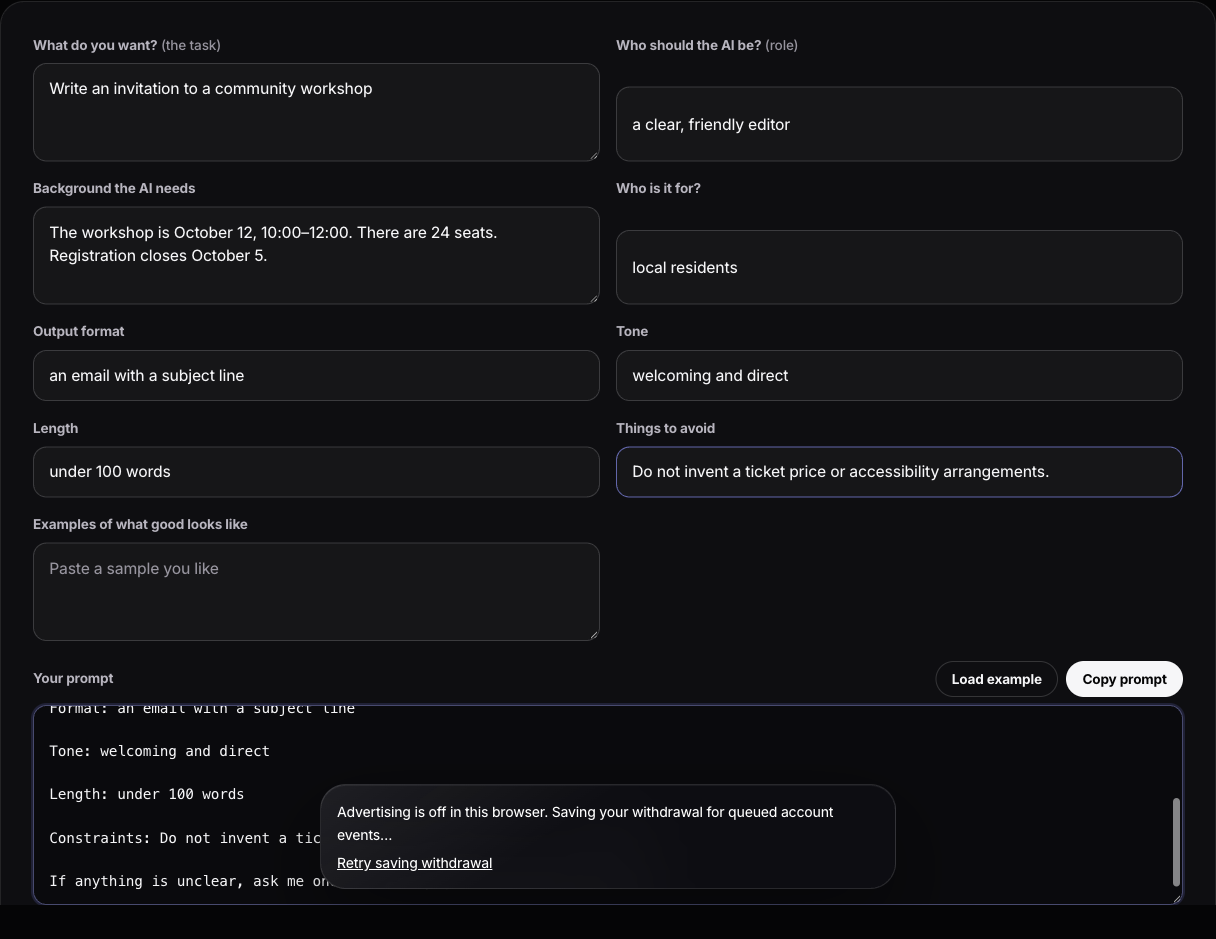
Actual public tool, checked September 17, 2026. The workshop details are fictional.
The assembled text appears under Your prompt. Use Copy prompt, then paste it into a chat when you have access. The builder assembles instructions locally; it does not generate the email itself.
Before sending any resulting email, check all four facts: October 12, the two-hour time slot, 24 seats and the October 5 deadline. If the answer invents a price, ask: “Remove the ticket price; it is not in the supplied facts.” If it is too long, ask for a shorter version that preserves those facts.
For a document task, use the PDF walkthrough and downloadable practice file. For more help writing the request, see how to write an AI prompt.
The single biggest jump in output quality comes from adding three things to any request: who it is for, what it is for, and what constraints apply.
Instead of “write an email to my landlord,” try:
Write an email to my landlord about a boiler that's been broken for eleven days. I've reported it twice by phone with no visit booked. I want it fixed this week and I want a written record. Firm but not hostile — I'd like to renew this lease. Under 150 words.
Act as an experienced operations manager reviewing a process for the first time. Here's how we currently handle refunds: [describe]. Give me the three biggest weaknesses, ranked by what they cost us, each with the specific change you'd make. Table format. Be blunt.
One useful technique is to let the assistant gather missing context before it answers:
Before you answer, ask me every question you need in order to give a genuinely useful answer rather than a generic one. One at a time. Don't start until you have enough.
The current catalog can include models from OpenAI, Anthropic, Google, xAI, and DeepSeek. The selector shows the live name and availability; attachment controls reflect whether an available model can accept the material you added.
When an answer feels off, try the same brief with another available model. Treat the result as another perspective, not verification: check factual claims against reliable sources even when both answers agree.
Specialist assistants provide a named role, a short brief, and suggested prompts for recurring jobs. They are starting points rather than substitutes for the context only you can provide.
For work: Business Planner, Marketing Expert, Interview Coach, Research Assistant, Financial Analyst, Lawyer.
For learning: Study Helper, Language Teacher, Research Assistant.
For life: Chef, Travel Guide, Fitness Coach, Wellness Advisor, Routine Planner, Relationship Coach, News Reporter.
For making things: Creative Writer, Logo Designer, Tattoo Artist.
And: World Cup Expert, for when that is what the week is about.
Use an assistant when the job repeats. Type into a general chat when it does not.
Note the boundaries on two of them: the Lawyer and Financial Analyst assistants are for understanding terms, comparing scenarios, and preparing better questions — not for advice you act on without a qualified professional.
Generate images from a prompt. The selected image model may also accept reference photos when the picker says it does. Specificity helps: name the subject, style, lighting, palette, composition, format, and anything that must remain unchanged.
Turns a still photograph into a short video when the animation service and selected effect are available. Use only photos you have the right and permission to animate.
Hands-free conversation. It can be useful while cooking or walking, and for language practice where speaking is the skill and typing is not. Do not use it when interacting with a screen would be unsafe.
When an available model publishes YouTube capability, submit a supported YouTube link for a summary and follow-up questions. Verify important details against the video.
Work with your own documents: contracts, reports, research papers, statements. Ask targeted questions rather than “summarize this,” and verify anything numerical against the source. Tables and scanned pages are where document extraction is weakest.
When the connected catalog publishes an available research tier, use it to retrieve current sources rather than relying only on model recall. Open the sources before repeating a claim.
Create an account-synced goal with a cadence and time, review the generated plan, and follow its scheduled message history. Enrolled browsers can receive Web Push when goal reminders are enabled.
The pattern that changes the most for people: stop asking about the world and start asking about your material. A contract you were sent, a report you have to present, your own notes, a photo of a machine you cannot operate. That is where the answer is one you could not have got from a search engine.
Start with an available general chat model. If the task matters, compare another available model using the same brief and evaluate both against your source material and constraints.
No. Add context, state constraints, and ask it to ask you questions. That covers most of the value; the rest is diminishing returns.
Yes. Signed-in conversation history syncs with the same account across browser and iPhone. A new conversation still needs its own relevant context.
Yes, and conversations sync, so something started on one continues on the other.
Use File Assistant for a document you need to inspect, AI Research for a current question that needs sources, or AI Goals for a plan you want to revisit. Start with low-risk material and verify anything consequential.
Try it in ChatUp
Run the prompts above against the model that suits the task, keep the useful context across chats, and pick it back up on any device.
Try for FreeBuild a prompt from your task, facts, format, and constraints. Try a fictional workshop brief, then check the answer against a concrete checklist.
Your downloads folder is full of documents you meant to read. Here is how to get a summary you can act on, and how to tell when the summary is wrong.
Turn long PDFs into useful conversations while keeping every summary, number, and conclusion grounded in the original document.
A practical framework for choosing an AI chatbot app that goes beyond conversation and helps with real tasks.